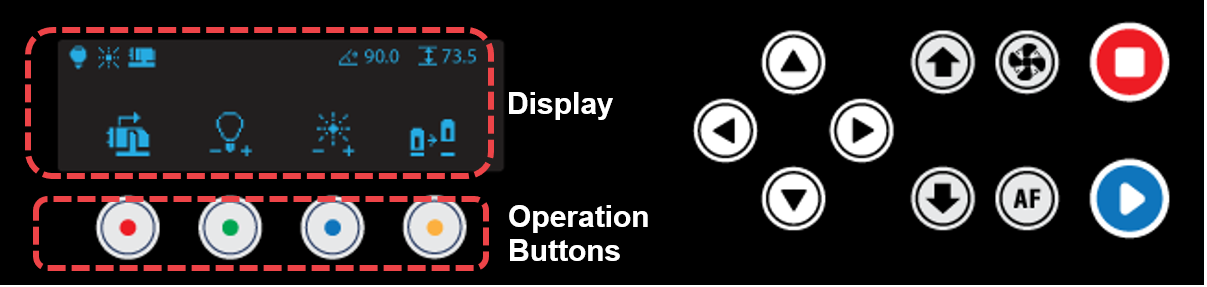
| Display | Status display | ||
| Operation Buttons | Activate the operations intended to perform | ||
 |
Direction Key (X,Y/Z/A) |
Marking area adjustment  (X) Moves tilting angle (X) Moves tilting angle  (Y) Moves A axis (Y) Moves A axis |
|
  |
Direction Key (Z) | Moves Z axis up and down | |
 |
Blower ON/OFF | Blower power button • Automatic control: The device starts automatically once the marking operation begins and stops automatically once the marking operation is completed. • Manual operation: Automatic control is deactivated if the device is manually switched on. Once the marking operation is completed, the device should be manually turned off. |
|
 |
Auto Focus | • AUTO FOCUS: Short press to auto-focus the laser to the material height. *Auto focus is activated once the program is connected. *Only for flat marking *Auto focus maximum measurement height: 55mm *Auto focus cannot be used on materials that would not reflect red laser like acrylic, glass, red anodized aluminum, or chrome-plated pendants. • MENU: Long press to enter menu mode. 1: Product Info 2: Status LED Brightness 3: Reset Memory Long press and hold  button (for more than 2 seconds) until it beeps to run the menu. button (for more than 2 seconds) until it beeps to run the menu. |
|
 |
Start | Start marking button • Start marking: Long-press (for 2 seconds) the [Start] button to start marking. • Repeat marking: Press the [Start] button to finish marking, then double-press (tap twice) the [Start] button to repeat marking. |
|
 |
Stop | Stops/cancels marking | |