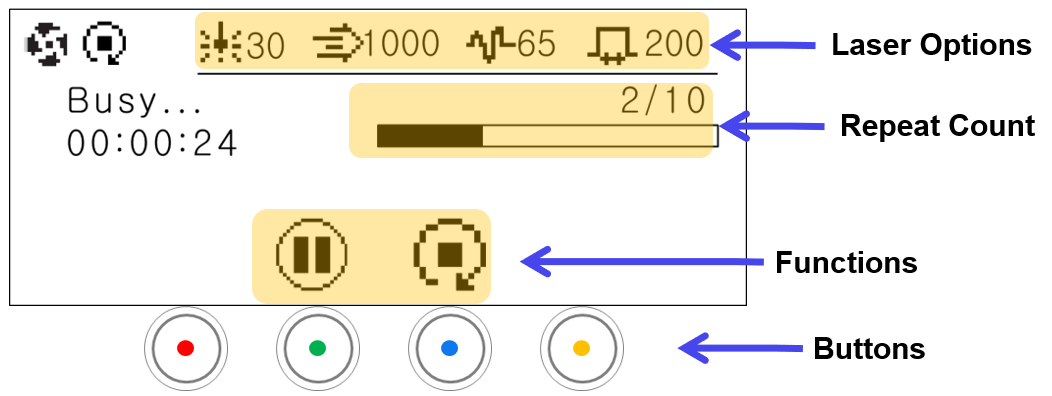
| Status Display |  |
Stop after current operation | The marking does not stop immediately; it stops after completing the marking in progress. |
| Laser Options |  |
Power | Displays set laser power value |
 |
Speed | Displays set laser speed value | |
 |
Frequency | Displays set laser frequency value | |
 |
Pulse width | Displays set laser pulse width value | |
| Time left | The remaining time until marking completion is displayed. (Example: 2/10 → performing 2 times out of a total 10 markings) |
||
| Repeat Count | When setting a repeat count, the number of repeats is displayed. ※Calculate the time required for the 1st cycle. |
||
| Functions |  |
Pause | Pause the operation in progress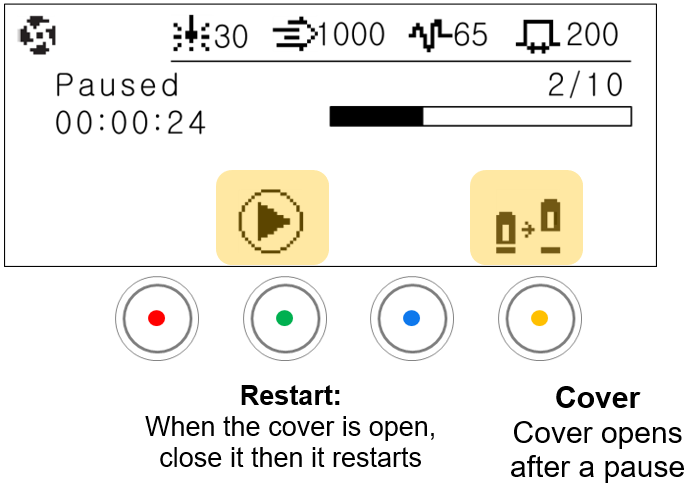 |
|
Stop after current operation | End repeated marking in progress. The marking does not stop immediately; it stops after completing the marking in progress. | |