Select the toolpath object to see its property and/or to adjust its speed and depth. The toolpath object property will appear on the left side of the screen.
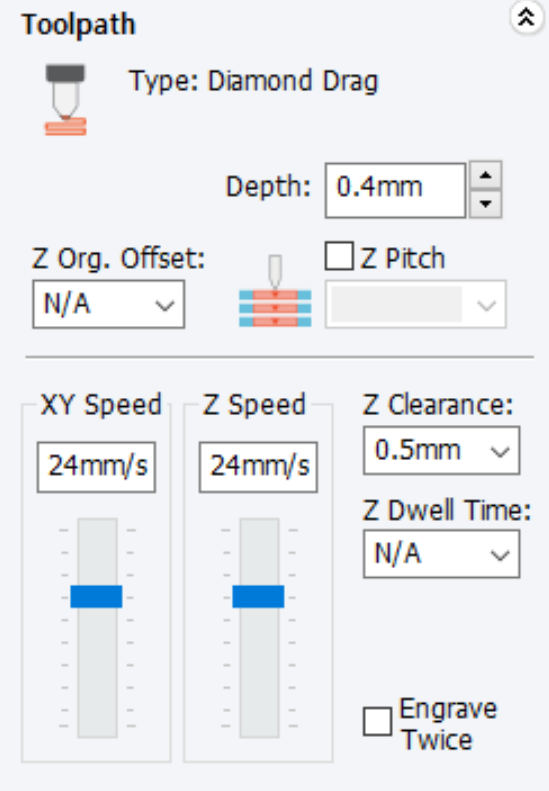
| Depth | Engraving: Refers to the applied pressure and not the actual engraving depth. The higher the pressure is, the deeper it imprints. Cutting: Refers to the actual engraving depth when using rotary tools like end mills, V cutters, etc. |
| Z pitch | Designate the depth when cutting the engraving depth little by little. This option is necessary when cutting thick materials with a thin tool.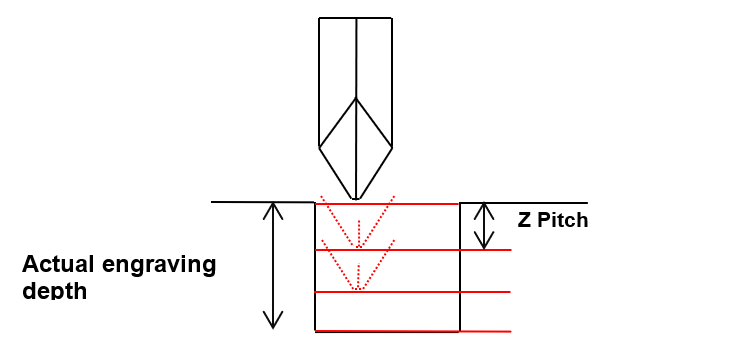 |
| XY speed | Designate a speed at which XY axis will move during the engraving. |
| Z speed | Designate a speed at which Z axis will move during the engraving. |
| Z clearance | This designates the height to be applied for the clearance between the tool and the surface of material when moving to another engraving location. When moving to another engraving location, it is necessary to lift Z axis to prevent the tool from coming in contact with the material surface before moving. 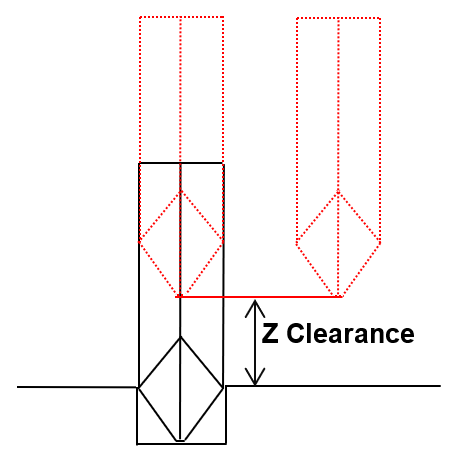 |
| Z dwell time | This designates no-load rotation time of end-mill and V-cutter after they reach the target depth and before moving to X, Y axis point. It is possible to damage the tool as rotation speed reduces while engraving. Set up the Z-dwell time to recover the full rotation speed before engraving. ✽Recommended time: 0.5 ~1 second. |
| Engrave twice | Engrave the design twice. |