¶ Spindle
- Place and secure a flat material on the clamp.
- Press
 button to enter menu mode.
- Use


 buttons. When 3.Calibration menu appears on the LCD window, press
  button to run the menu.
- Select the “3.Pointer/Flat” then press button to run the menu.
- The tool draws a cross (+) line on the material and the laser pointer is turned on.
- Move the laser pointer to the center of the cross by using the direction keys then press button.
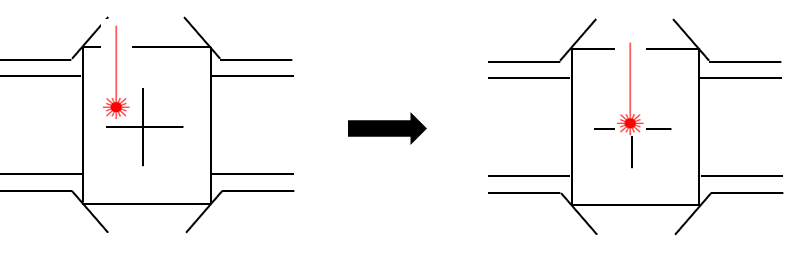
- The laser pointer moves closer to the material to calibrate the laser pointer’s origin. Move the laser pointer to the center of the cross by using the direction keys on the engraving machine then long-press and hold the button (for more than 3 seconds) until it beeps to confirm that the setting is saved.
¶ Rotation clamp
- Remove the installed clamp. To remove the installed clamp, turn the clamping knob to the left then pull out the clamp and spacer block.
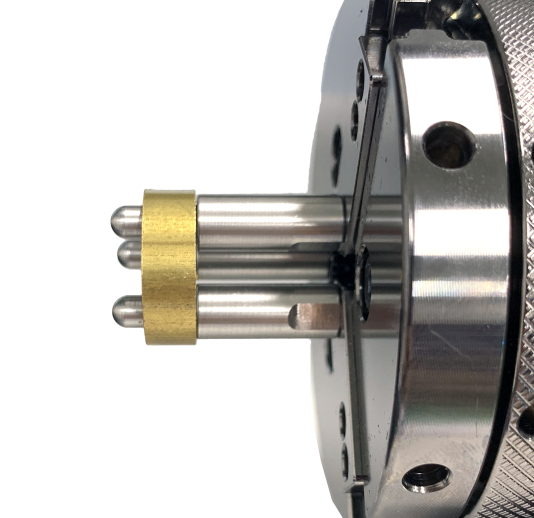
- Secure the ring to the rotation clamp.
(When setting the laser pointer origin, rings with 18mm width (Max.18mm(0.7in) can be used. Rings with width over 18mm (Over 18mm(0.7in) cannot be used.
- Press button to move the tool to the clamp.
- Use buttons. When 3.Calibration menu appears on the LCD window, then press button to run the menu.
- Select the “4.Pointer/Rotary” then press button to run the menu.
- The tool draws a cross (+) on the material and the laser pointer is turned on.
- Use the direction keys to move the laser pointer to the center of the cross then press button to save the settings.
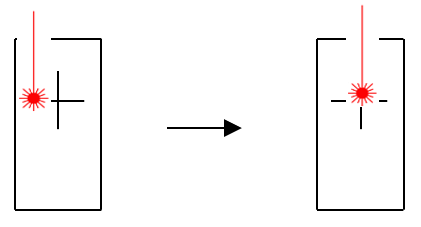
- The laser pointer moves closer to the material to calibrate the laser pointer’s origin. Move the laser pointer to the center of the cross by using the direction keys on the engraving machine then press and hold the button (for more than 3 seconds) until it beeps to confirm that the setting is saved.
¶ L-Tool
- Remove the installed clamp. To remove the installed clamp, turn the clamping knob to the left then pull out the clamp and spacer block.
- Secure the ring to the rotation clamp.
(When setting the laser pointer origin, rings with 18mm width (Max.18mm(0.7in) can be used. Rings with width over 18mm (Over 18mm(0.7in) cannot be used.
- Press button to enter menu mode.
- Press button. When 3.Calibration menu appears on the LCD window, then press button to run the menu.
- Select the “5.Pointer/L-Tool” then press button to run the menu.
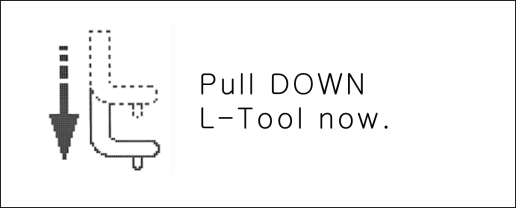
- When a “Pull DOWN” message appears on the LCD window (as shown below), pull the L-Tool down to the engraving line 1 (RING1) then press button.
- The tool draws a cross (+) line on the material.
- When “Push UP message appears on the LCD window (as shown below), push the L-Tool up then press the button. The laser pointer is turned on.

- Move the laser pointer to the center of the cross by using the direction keys then press the button to confirm that the setting is saved.
- The laser pointer moves closer to the material to calibrate the laser pointer’s origin. Move the laser pointer to the center of the cross by using the direction keys on the engraving machine then long-press and hold the button (for more than 3 seconds) until it beeps to confirm that the setting is saved.